Your Tile Sub Showed Up Today. The Tile Did Not. Project Stalled. Crew Sent Home.
WFP tracks every material at the project-step level, needed, ordered, received, so your suppliers, your crews, and your schedule all run on the same data.
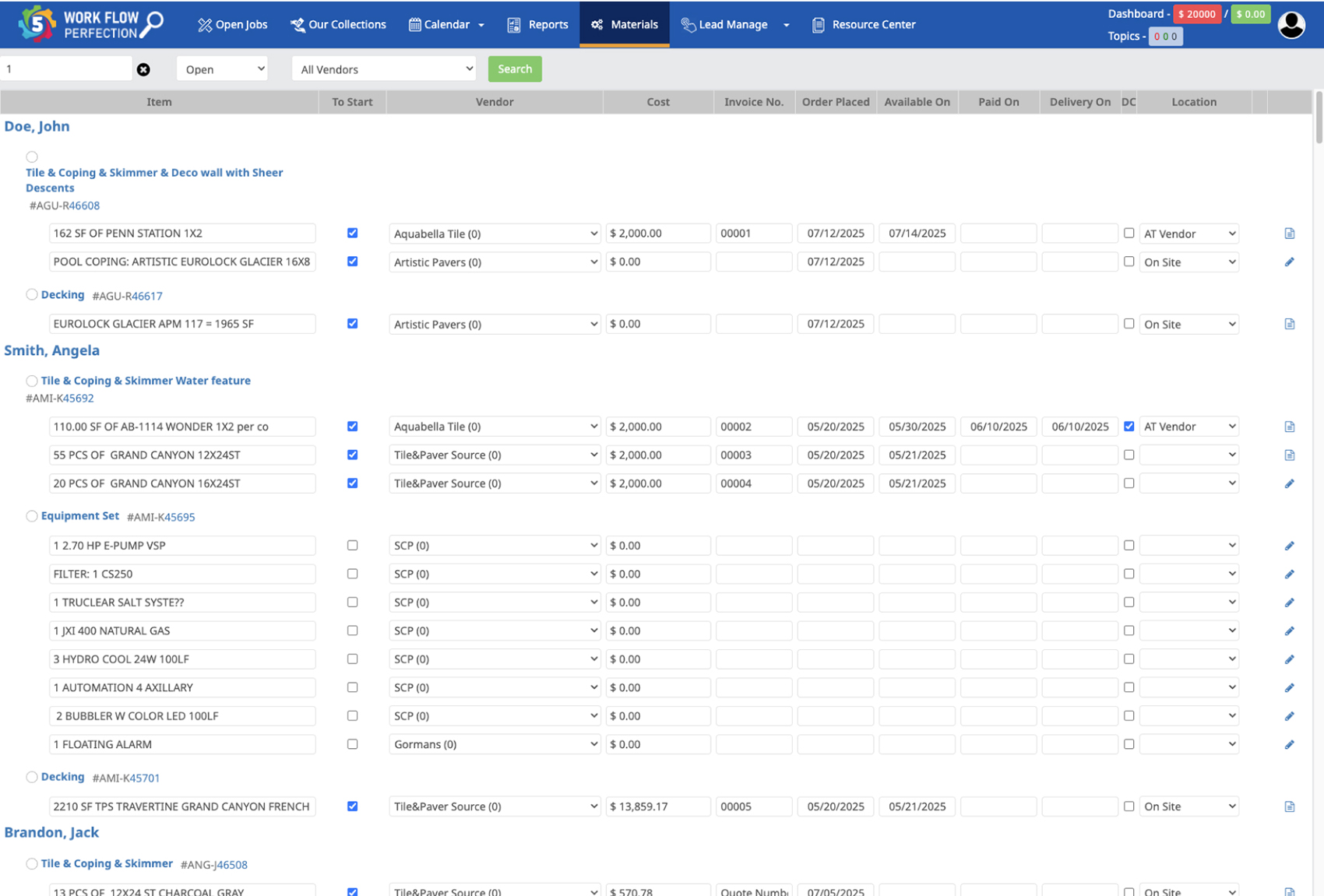
A Pool Build Needs the Right Material in the Right Phase. Every Time.
It is Wednesday morning. Your tile sub arrives at the Henderson project ready to spend three days on the waterline. The tile was supposed to be on site Tuesday afternoon. It is not. The supplier says it shipped, then says it did not, then says the previous order had a damaged box and they pulled it back. Your PM cancels the sub. The sub is now booked for another job for the next week. The tile arrives Friday. The Henderson project just lost six days.
Now multiply that. You have 25 active builds. Every one needs gunite, then plumbing, then tile, then coping, then decking, then equipment. Each is a different supplier with a different lead time. Some run a week, some run six. Procurement is tracking this in a spreadsheet. The PM is tracking it in his head. The two sets of data disagree, and Jessica finds out about a missed delivery from a sub on site, not from the construction materials management software that should have flagged the lead-time risk on Monday.
Pool builds do not stall because of one big failure. They stall because of a hundred small material misses, each invisible until a sub is standing on a slab that is not ready.
The schedule does not break at the project level. It breaks at the step level, one missing material at a time.
Materials Tracked at the Project Step, Not the Project. Procurement and PMs on the Same Screen.
WFP attaches every material requirement to a specific project step. The tile is not needed for the Henderson project. It is needed for Henderson Tile Step, scheduled for day 35. Procurement, the PM, and the schedule all see the same allocation, and a delay shows up the moment it slips, not the day the sub arrives.
Per-Step Material Allocation
Each project step lists its required materials with quantities, supplier, lead time, and target on-site date. Gunite for the Gunite step. Glass mosaic tile for the Tile step. Variable-speed pumps and salt cells for the Equipment step. Construction material tracking lives at the step level, where it is operationally useful.
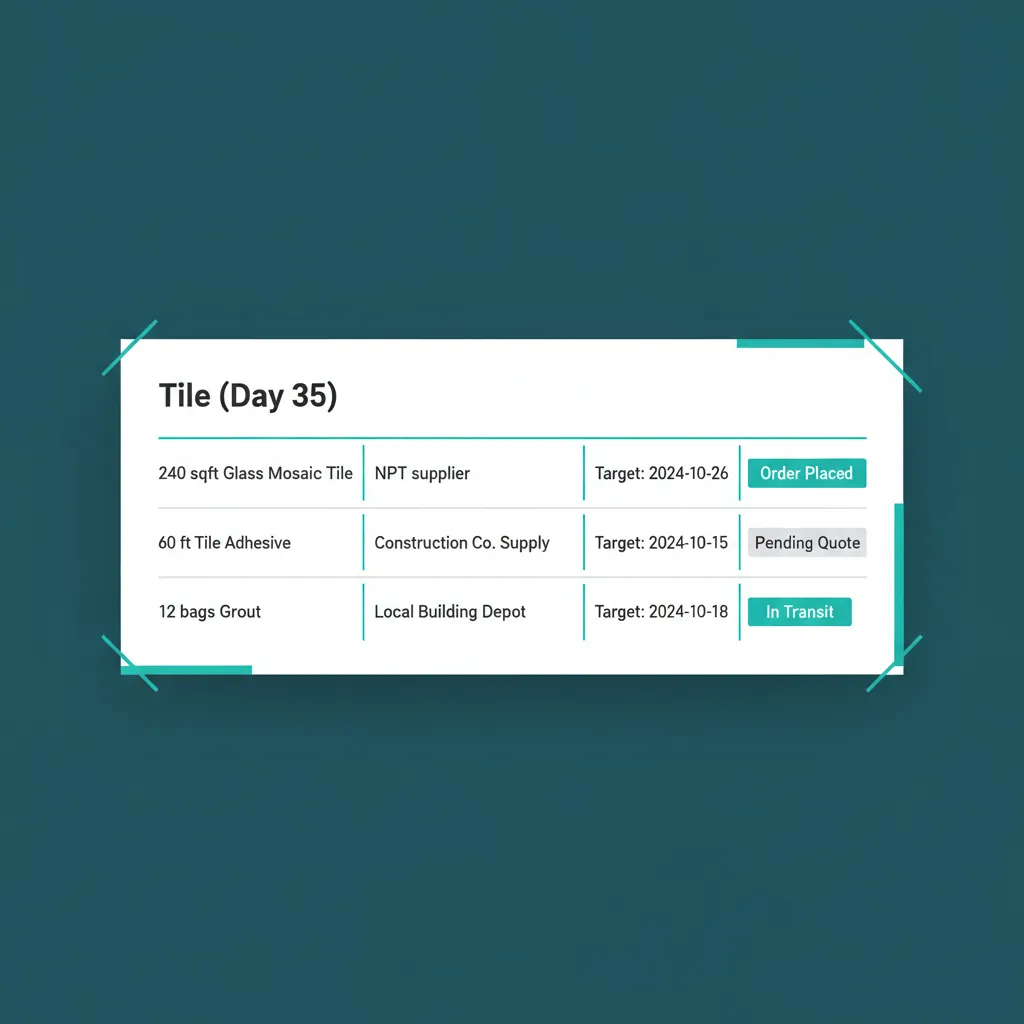
The Tile step holds the tile. Not the project. Not a global SKU list.
Needed, Ordered, Received Status Pipeline
Every material moves through three states: Needed (allocated but not ordered), Ordered (PO placed, awaiting delivery), Received (on site, ready to use). Each state change is timestamped and attributed. Material ordering construction teams used to do over text and email now lives in one timeline.
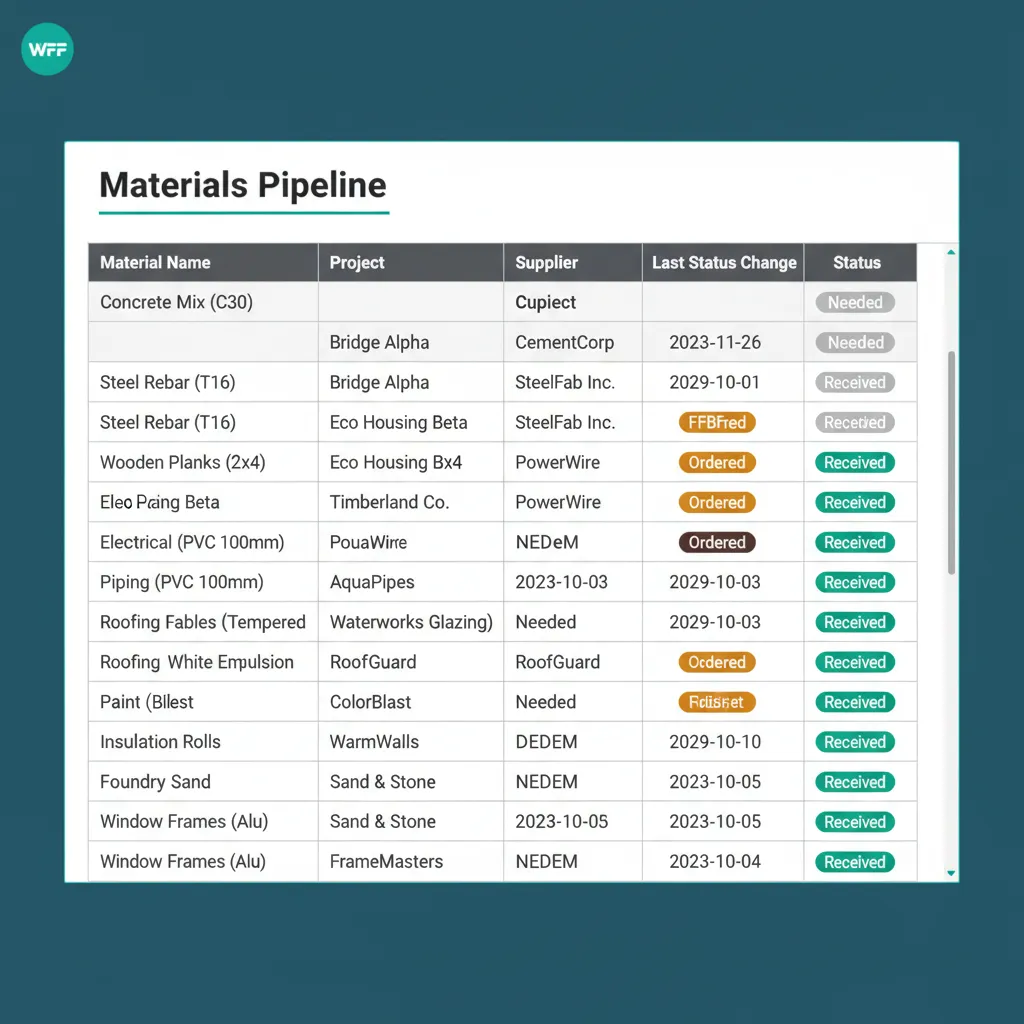
Three states. One color each. Procurement and the PM read the same row the same way.
Material Cost Tracking Per Step
Each material captures its cost at order and at receipt. Variances are flagged when received cost differs from what was ordered. Material cost rolls up to step cost, then to project cost, then into project profitability on the financial dashboard. Project materials tracking and cost tracking on the same row.
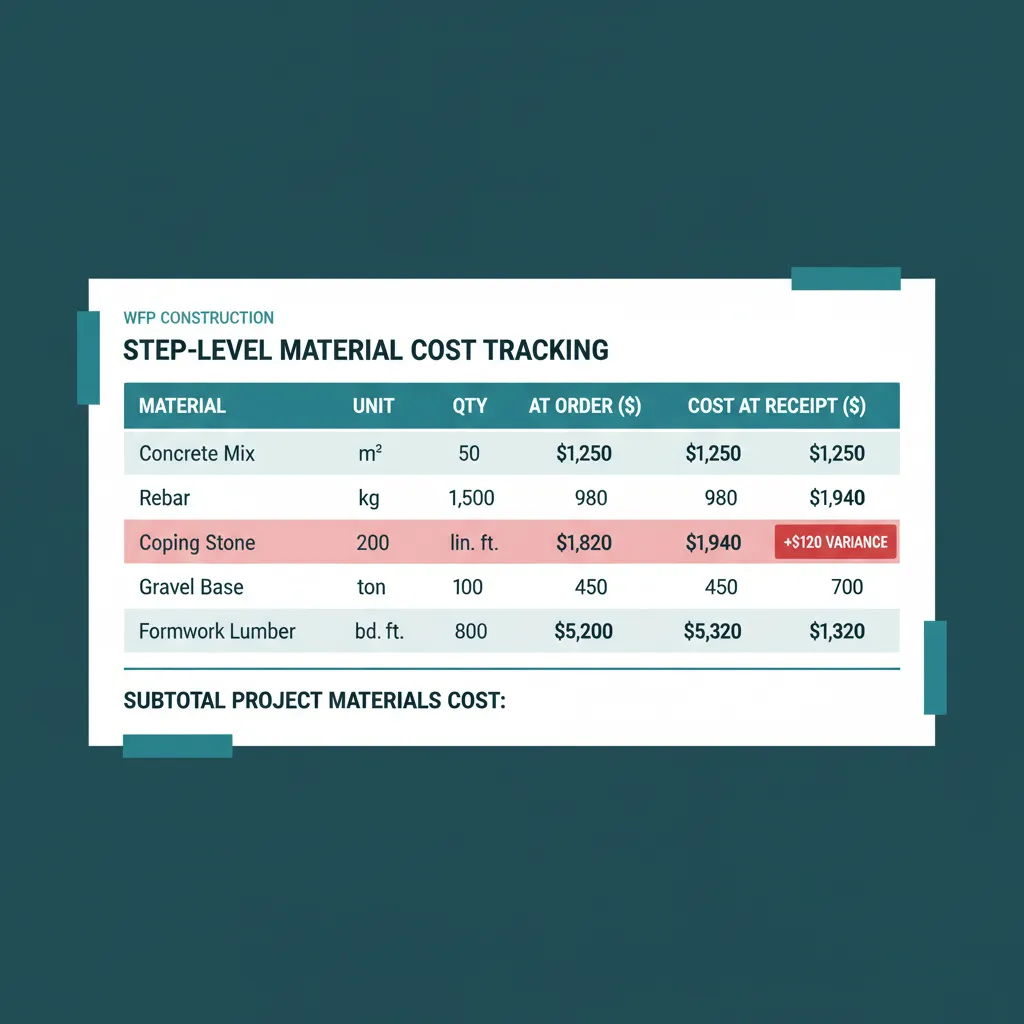
Coping ordered at $1,820. Received at $1,940. The variance flag appears the day the invoice does.
Procurement and PM Alignment
Procurement has a procurement dashboard that lists every material currently in Needed or Ordered status across all projects. PMs see the same data filtered to their projects. When procurement marks something Ordered with a delivery date, the PM sees it without anyone calling anyone. Procurement software for construction without a separate system that disagrees with the PM view.
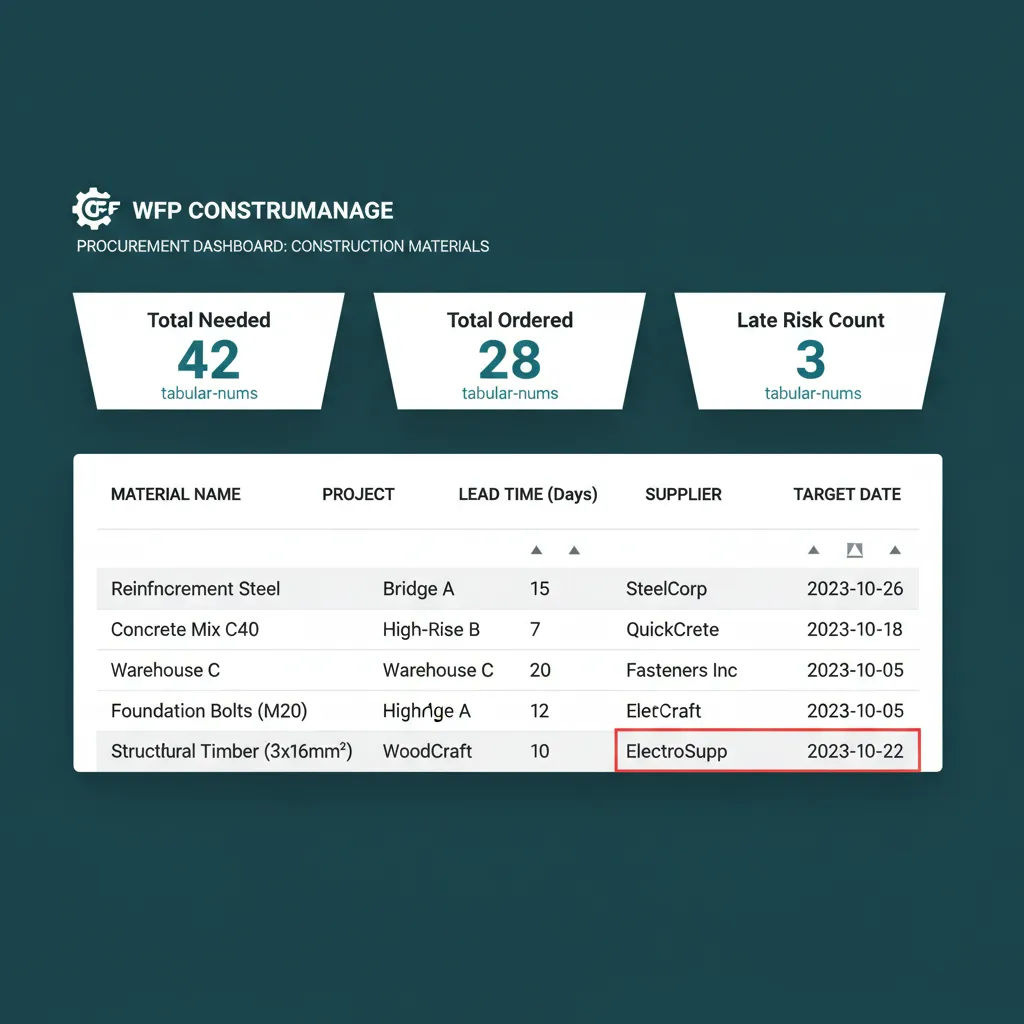
Procurement sees the same row the PM sees. Nobody calls anyone to reconcile.
Lead Time Awareness on the Schedule
Materials with long lead times, gunite scheduling, custom coping, salt cells, appear on the schedule in time to be ordered. The system flags steps that have unordered materials when their target date is inside the lead-time window. The PM does not have to remember to check. The flag does the checking.
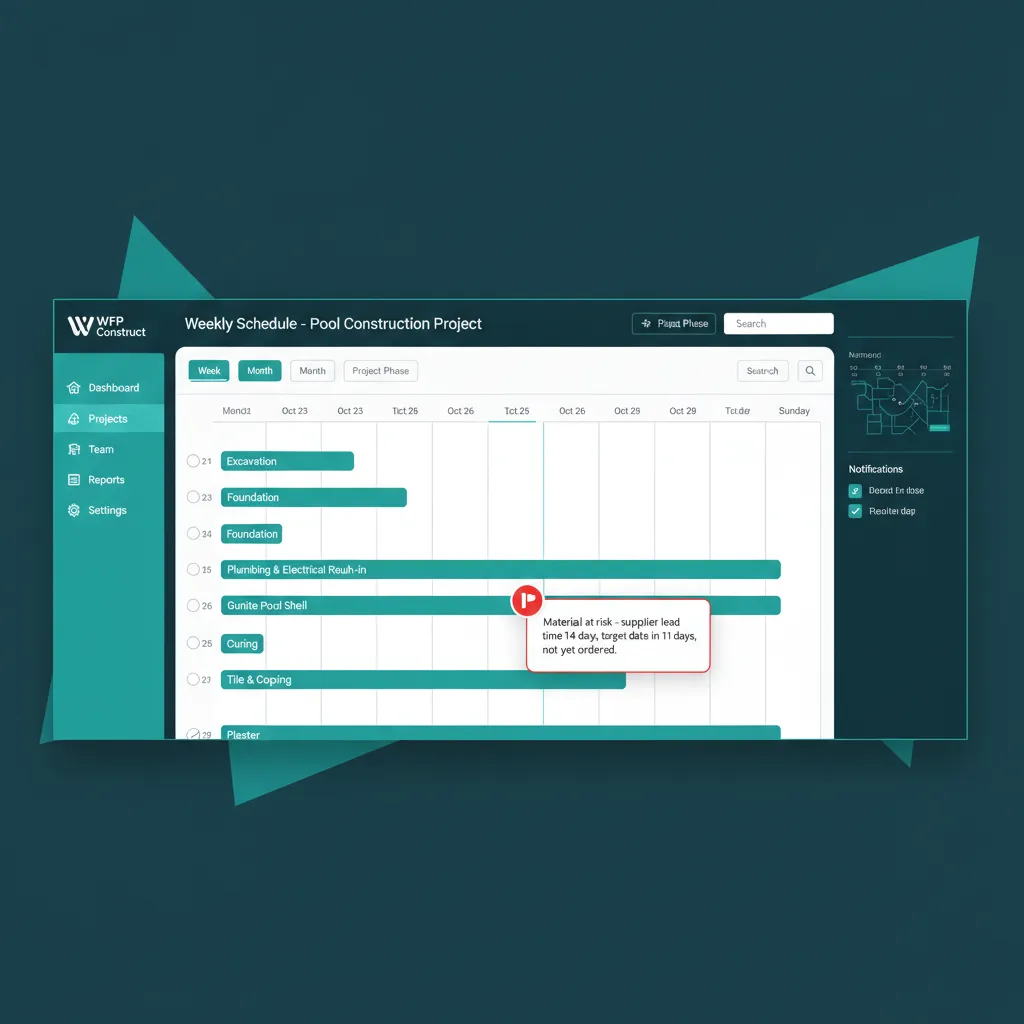
Lead time 14 days. Target date in 11 days. Not yet ordered. The flag appears now, not Friday.
WHAT PROJECT-LEVEL TRACKING MISSES
Materials Don't Belong to the Project. They Belong to the Step.
Most construction PM tools track materials at the project level: a list of stuff a project needs, somewhere in the project profile. That tells you nothing useful on a Wednesday morning. The tile was needed two days ago for the Tile step. Knowing the project needs tile in general did not prevent the sub from showing up to no tile.
WFP attaches materials to the step that needs them, with the date that step is scheduled and the lead time of the supplier. When the lead time crosses the target date, the platform flags it. The PM does not have to remember to check. The procurement team does not have to chase the PM. The schedule does not have to break for the team to find out.
Why we built this
Step-level data is operational. Project-level data is just a list.
BATTLE-TESTED
From four to six months of build time, down to eight weeks.
Inside the pool construction company where WFP was built, the build-time average dropped from four to six months down to eight weeks. A meaningful piece of that compression came from materials never holding up a phase. When the right pool construction materials software lives at the step level, tile arrives the day before tile day, coping arrives before the coping crew, and the schedule moves forward instead of waiting. That is what step-level material tracking does to a build calendar.
Common Questions About Materials Management
Yes. Every material requirement is attached to the step that needs it, with quantity, supplier, lead time, and target on-site date. Gunite belongs to the Gunite step, tile belongs to the Tile step. Step-level allocation is the default, not an optional add-on.
Yes. Each material captures cost at order and cost at receipt. Variances are flagged when the two differ. Material cost rolls up to step cost, then to project cost, then into project profitability on the financial dashboard. One number flows from invoice to P&L.
Yes. Procurement has a dashboard listing every material in Needed or Ordered status across all projects. PMs see their own projects materials with the same status. Both teams operate on one source of truth, which is why the Wednesday morning argument over what was actually ordered stops happening.
Materials marked Ordered capture supplier, PO number, expected delivery date, and notes. Direct PO sending varies by supplier integration. The platform consolidates the workflow regardless: every PO has a record, every record has a status, every status drives the schedule.
When a step target date enters its material lead-time window without that material being marked Ordered, the platform flags it on the project, on the schedule, and on the procurement dashboard. Late risk is visible before it becomes a missed delivery. The flag is loud at 14 days out and louder at 7.
Yes. The procurement dashboard rolls up every material in Needed or Ordered status across every active project, sortable by lead time, supplier, target date, or step. One view of every supply requirement on the books, ready for a Monday morning order session.
Related Features
See Materials Management in Action.
Bring your last late delivery and we will show you how WFP would have surfaced the lead-time risk before the sub got sent home.
Schedule a DemoNo 6-month onboarding commitment. No per-seat pricing. Just a conversation about how your operation could run.